Scheduler Policy
Summary
Currently, in a cluster with many GPU nodes, nodes are not binpack or spread when making scheduling decisions, nor are GPU cards binpack or spread when using vGPU.
Proposal
A node-scheduler-policy and gpu-scheduler-policy can be set in config. The scheduler uses this policy to implement node binpack or spread or GPU binpack or spread. Pod annotations hami.io/node-scheduler-policy and hami.io/gpu-scheduler-policy can override the default scheduler config.
User Stories
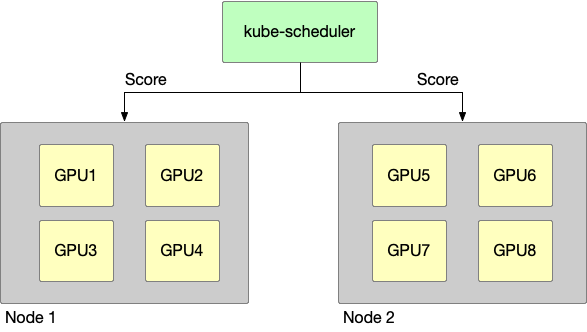
This is a GPU cluster, having two nodes, the following story takes this cluster as a prerequisite.
Story 1
node binpack, use one node’s GPU card whenever possible, e.g.:
-
cluster resources:
- node1: GPU having 4 GPU device
- node2: GPU having 4 GPU device
-
request:
- pod1: Use 1 GPU
- pod2: Use 1 GPU
-
scheduler result:
- pod1: scheduled to node1
- pod2: scheduled to node1
Story 2
node spread, use GPU cards from different nodes as much as possible, e.g.:
-
cluster resources:
- node1: GPU having 4 GPU device
- node2: GPU having 4 GPU device
-
request:
- pod1: Use 1 GPU
- pod2: Use 1 GPU
-
scheduler result:
- pod1: scheduled to node1
- pod2: scheduled to node2
Story 3
GPU binpack, use the same GPU card as much as possible, e.g.:
-
cluster resources:
- node1: GPU having 4 GPU device, they are GPU1,GPU2,GPU3,GPU4
-
request:
- pod1: Use 1 GPU, gpucore is 20%, gpumem-percentage is 20%
- pod2: Use 1 GPU, gpucore is 20%, gpumem-percentage is 20%
-
scheduler result:
- pod1: scheduled to node1, select GPU1
- pod2: scheduled to node1, select GPU1
Story 4
GPU spread, use different GPU cards when possible, e.g.:
-
cluster resources:
- node1: GPU having 4 GPU device, they are GPU1,GPU2,GPU3,GPU4
-
request:
- pod1: Use 1 GPU, gpucore is 20%, gpumem-percentage is 20%
- pod2: Use 1 GPU, gpucore is 20%, gpumem-percentage is 20%
-
scheduler result:
- pod1: scheduled to node1, select GPU1
- pod2: scheduled to node1, select GPU2
Design Details
Node-scheduler-policy
Binpack
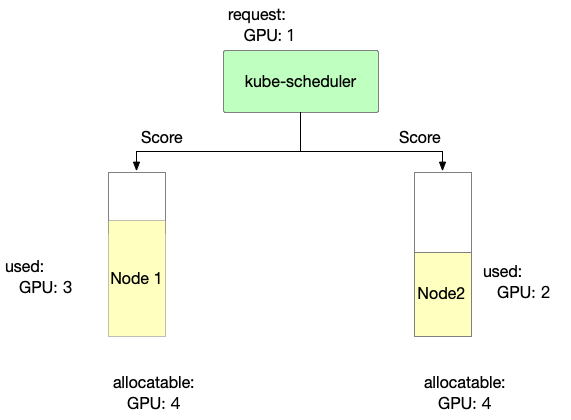
Binpack mainly considers node resource usage. The more full the usage, the higher the score.
score: ((request + used) / allocatable) * 10
- Binpack scoring information for Node 1 is as follows
Node1 score: ((1+3)/4) * 10= 10
- Binpack scoring information for Node 2 is as follows
Node2 score: ((1+2)/4) * 10= 7.5
In Binpack policy, Node1 is selected.
Spread
Spread mainly considers node resource usage. The less it is used, the higher the score.
score: ((request + used) / allocatable) * 10
- Spread scoring information for Node 1 is as follows
Node1 score: ((1+3)/4) * 10= 10
- Spread scoring information for Node 2 is as follows
Node2 score: ((1+2)/4) * 10= 7.5
In Spread policy, Node2 is selected.
GPU-scheduler-policy
Binpack
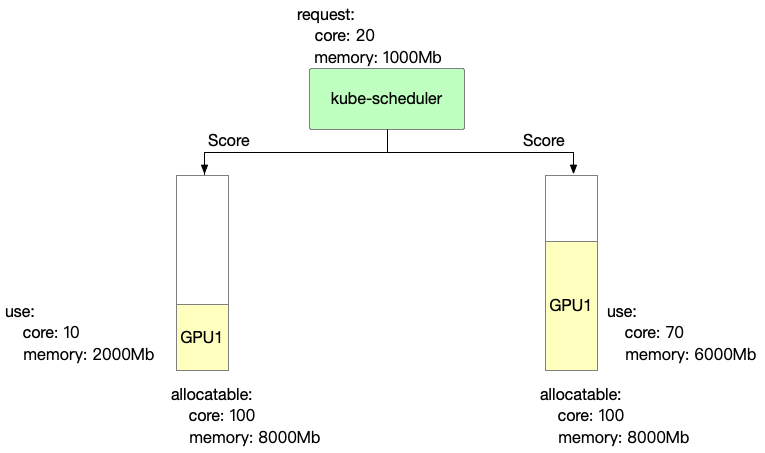
Binpack mainly focuses on the computing power and video memory usage of each card. The more it is used, the higher the score.
score: ((request.core + used.core) / allocatable.core + (request.mem + used.mem) / allocatable.mem)) * 10
- Binpack scoring information for GPU 1 is as follows
GPU1 Score: ((20+10)/100 + (1000+2000)/8000)) * 10 = 6.75
- Binpack scoring information for GPU 2 is as follows
GPU2 Score: ((20+70)/100 + (1000+6000)/8000)) * 10 = 17.75
In Binpack policy, GPU2 is selected.
Spread
Spread mainly focuses on the computing power and video memory usage of each card. The less it is used, the higher the score.
score: ((request.core + used.core) / allocatable.core + (request.mem + used.mem) / allocatable.mem)) * 10
- Spread scoring information for GPU 1 is as follows
GPU1 Score: ((20+10)/100 + (1000+2000)/8000)) * 10 = 6.75
- Spread scoring information for GPU 2 is as follows
GPU2 Score: ((20+70)/100 + (1000+6000)/8000)) * 10 = 17.75
In Spread policy, GPU1 is selected.
Mutex
Mutex gives a pod exclusive use of a GPU card. Only cards with no existing workloads (used == 0) are eligible; any card already in use is skipped with the ExclusiveDeviceAllocateConflict reason. If every card on a node is in use, the pod cannot be scheduled to that node.
Set it per pod via the annotation:
metadata:
  annotations:
    hami.io/gpu-scheduler-policy: "mutex"
Using the same example, GPU1 and GPU2 both already have workloads, so neither is eligible and the pod stays pending until a fully idle card is available. A card allocated to a mutex pod can still be selected for other pods afterwards; to keep the card exclusive for the lifetime of the workload, request all of its resources or use it together with use-gpuuuid constraints.
